Kalshi App Review: What is the Kalshi App?
If you want to install Kalshi’s application, we’ll walk you through the steps to take on this page. It’s simple, though, because you can get it directly through the Apple App Store or Google Play Store. We’ll explain how the app works for prediction market trading, the event contracts, and other necessary details. Keep reading to learn more.
Facts
| Deposit time | instant |
|---|---|
| Support Types |
- Quick Facts About the Kalshi Mobile App
- What Is the Kalshi App and How Does It Work?
- Available Prediction Markets on The Kalshi Mobile App
- Usability of The Kalshi Mobile App
- How to Install the Kalshi App
- Latest Markets on the Kalshi App
- Payment Methods on The Kalshi Trading App
- Pros and Cons of The Kalshi Mobile App
- Conclusion – Get the Kalshi Mobile App for Trading Event Contracts
- Read More
- Kalshi App FAQ
Quick Facts About the Kalshi Mobile App
- The Kalshi prediction market app works on iOS and Android devices.
- Kalshi is regulated by the CFTC in the US.
- You use the app for trading event contracts, not online betting.
What Is the Kalshi App and How Does It Work?
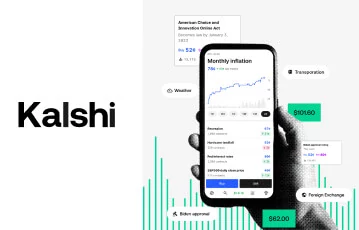
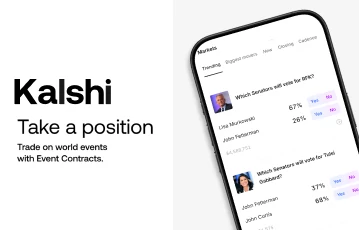
The Kalshi app lets you trade event contracts in a Yes or No format. Besides, the prices of all Kalshi event contracts are based on supply and demand conditions, as the brand doesn’t set the rate.
Event Contracts and Trading Fees
As confirmed in our review, event contracts on the app cost from $0.01 to $0.99.
Here’s an illustration from an NBA event we saw:
| Team | Contract prices |
|---|---|
| Miami Heat | Yes @ $0.63 No @ $0.39 |
| Atlanta Hawks | Yes @ $0.40 No @ $0.61 |
If you predict Miami to win, you buy Yes event contracts for the team or No for the Atlanta Hawks. Once the event is over and the market settles, Kalshi pays $1 for each event contract if you nail your predictions.
Note that Kalshi trading fees apply as you buy or sell event contracts. From our findings, the app uses a progressive approach based on price and the total number of contracts. That said, the cost stays between $0.01 and $0.02 per contract.
Legal Status of The Kalshi Prediction Market App
We verified that Kalshi is legal in the United States. The brand is regulated by the Commodity Futures Trading Commission (CFTC), so it has federal approval to offer prediction markets in the country.
Consequently, the App Is Permitted in Many States
However, we understand the regional online trading regulations may differ. Therefore, confirm with your local laws to know if you can install and use the Kalshi app for trading prediction markets.
Available Prediction Markets on The Kalshi Mobile App
In our experience, most US traders are interested in Kalshi sports markets, especially for the big leagues. However, the prediction trading app has much more than that.
We’ve detailed the main event types and subcategories to expect when you install the Kalshi application below:
| Prediction market | Categories |
|---|---|
| Sports | Basketball, Football, Baseball, Hockey, Tennis, Soccer, Golf, MMA, Cricket, Esports, Motorsport, Aussie Rules, Boxing, Lacrosse, Rugby, Darts, Chess |
| Politics | Elections, Senate, Congress, Local, International |
| Culture | Awards, Movies, Music, Television, Video Games |
| Crypto | BTC, ETH, SOL, XRP, DOGE, BNB, HYPE, Pre-Market |
| Economics | Fed, GDP, Global Central Banks, Growth, Housing, Inflation, Jobs & Economy, Oil and Energy |
| Climate | Climate Change, Temperature, Snow, Rain, Hurricanes, Natural Disasters |
Usability of The Kalshi Mobile App
Based on our analysis, the Kalshi mobile app isn’t complex to use. You won’t need a learning curve, as the interface displays all the available categories in the top section.
It takes one tap to switch from the Kalshi election markets to sports, climate, crypto, and all others.
In the bottom section, you’ll see a fixed menu that lets you browse events even faster. Via the menu, you can also access live markets and visit the Ideas section for trading insights from the community.
The effortless design is one of the main reasons we highly rate the Kalshi application.
How to Install the Kalshi App
Since the Kalshi application is available on official app stores, installing it isn’t difficult. First, click the links on this page to visit Kalshi and register an account if you’re 18+ years old.
From Our Observations, the Brand Will Verify Your Identity Automatically During Registration
However, if it doesn’t work, you’ll have to submit your documents. Once your account is ready, take the steps in the next sections to install the app.
Kalshi iOS App
On an iPhone or iPad, here’s our simple guide to follow:
-
Launch the Apple App Store and search for Kalshi
-
Spot the official prediction market app and press ‘Get’
-
Authorize using your Face ID or your Apple ID password
-
Tap ‘Open’ to launch the app when done
Kalshi Android App
If you use an Android smartphone or tablet, here’s what to do:
-
Open the Google Play Store on your device
-
Search for Kalshi and select the official app
-
Tap ‘Install’ and approve if required
-
Hold on for the app to download
-
Press ‘Open’ to launch the app when done
At this point, you can sign in to your account and start trading event contracts.
Latest Markets on the Kalshi App
-
 New $25 Kalshi Promo Code for Packers vs Vikings on NFL Sunday September 13th
 -
 New $25 Kalshi Promo Code for 49ers vs Rams in Melbourne on Thursday September 10th
 -
 Upgraded $25 Kalshi Promo Code for NFL Week 1 Through September
 - Upgraded $25 Kalshi Promo Code for NFL Week 1 Through September
-
 Updated $25 Kalshi Promo Code for College Football Saturday and NFL Week 1 on September 5th
 -
 Kalshi $10 Promo Code for Colorado at Georgia Tech on September 3rd
 -
 New $25 Kalshi Promo Code for College Football Week 1 and NFL Week 1 on September 4th
 -
 Upgraded $25 Kalshi Promo Code for the Tennis US Open First Round on August 31st
Payment Methods on The Kalshi Trading App
You can only buy and sell event contracts on the Kalshi mobile app after depositing. Likewise, if you get your predictions correctly, you’ll want to withdraw. In our Kalshi app review, these are the eligible payment methods we found:
- Debit card (Google Pay and Apple Pay)
- PayPal
- Venmo
- Cash App
- Bank transfer
- Wire transfer
- Cryptocurrency
The app’s minimum deposit is $10, except for wire transfer, which is $1,000. Regarding payouts, you can still withdraw as low as $10 with most Kalshi payment methods. However, from our checks, wire transfer payouts only work for $500,000 and above.
If you deposit using a debit card, a processing fee of up to 2% applies. Kalshi has no charges for all other deposit and payout methods, but the payment providers may.
Pros and Cons of The Kalshi Mobile App
After testing the Kalshi app, here are the main advantages and disadvantages we want you to be aware of:
- Available on iOS and Android
- Regulated by the CFTC
- Sports, politics, and other popular prediction markets
- Debit card deposit fees
Conclusion – Get the Kalshi Mobile App for Trading Event Contracts
Following our review, we conclude that Kalshi deserves its position as one of the best prediction market sites in the US. You can trade more conveniently by installing the mobile app on your iOS or Android device.
As We Explained, the Application Has Sports, Politics, Culture, Crypto, Economics, and Climate-Related Events
Thanks to the simple contract pricing and payout model, you won’t have trouble understanding how Kalshi works. Also, the app itself has a friendly design that takes zero time to learn.
To get started, click the banners on this page to visit Kalshi and register today. Then, follow our instructions to install the mobile app and deposit to trade event contracts. With CFTC approval, we have no doubts that Kalshi is legit, but remember that your local laws take precedence.
Read More
Kalshi App FAQ
- 📱 Does Kalshi provide an app for iOS and Android?
Yes, there’s a Kalshi app for iOS and also one for Android. Depending on your device type, you can install it from the Apple App Store or the Google Play Store.
- 💰 Does Kalshi pay real money?
Yes, Kalshi pays real money if you correctly predict outcomes of the featured events. The app pays $1 per event contract.
- 🔍 Is the Kalshi prediction market app legit?
Yes, the Kalshi mobile app is legit for trading prediction markets. Since the CFTC regulates it, the app is legally authorized to operate in the US. However, consider your local laws before downloading.
- ⚽ Is there sports betting on the Kalshi mobile app?
No, the Kalshi mobile app doesn’t involve sports betting. You only trade Yes/No contracts to predict outcomes in sports events, and the brand doesn’t set any odds.
Most Read Articles in October
-
 Best Prediction Market Sites of 2026: Kalshi, Polymarket & More
 -
 Polymarket Promo Code: Use for $20 in Credits
 - Kalshi Referral Code: What is The $10 Referral Code for Kalshi?
-
 Best Sites for 15-Minute Bitcoin Prediction Markets and How to Trade Them
 -
 Best Sites for 5-Minute Crypto Prediction Markets and How They Work
 - Crypto.com Promo Code for Prediction Markets in October 2026: Claim a $250 Bonus